AI for Lesson Planning: Better, Faster, Easier for K-12 and ESL
The Sunday-night knot is real. You stare at a blank plan, the coffee is cold, and your brain is already in tomorrow’s bell. You care deeply, yet the hours keep slipping into paperwork while your own dreams wait their turn. AI can quiet the noise. It turns your planning list into a simple flow, from standards to activities to assessments, in minutes. You still make the final calls, but the heavy lift gets lighter, and your voice stays at the center.
LESSONS PLANS
Jerusha
11/26/202510 min read


If you teach K-12 or ESL, you know every student brings a different mix of needs. AI helps you personalize without starting from scratch, adjusting reading levels, scaffolds, and supports for newcomers and multilingual learners. It translates, rewrites, and suggests, so adaptation feels natural instead of endless.
Faster prep creates space you can feel. That saved hour becomes a Canva template for your store, a newsletter draft for your tutoring offer, or time to learn the next step in your crypto plan. More ease at school, more energy for your location-independent goals.
You might be picturing long nights training a tool. That is not the plan here. AI writes a first draft, you shape it, and the clock gives you grace. Better output, less burnout.
Quality does not get watered down. AI helps pull standards, add checks for understanding, and build rubrics that match your goals. You set tone and values, it speeds the path.
For ESL needs, the lift is even clearer. Instant vocabulary lists, supports for phonics or fluency, simplified texts, and quick translations for families. You can meet students where they are, then move together.
In the next sections, you will see simple steps and prompts to try today. We will cover time-saving routines, smart personalization, and easy ESL adaptations, plus tools like MagicSchool.ai, Brisk Teaching, and Gibbly. Quick wins first, then tips to grow your planning system and your income streams.
Discover the Best AI Tools for Smarter Lesson Planning in 2025
Lesson planning does not need to eat your Sunday. The right tools cut prep time, support multilingual learners, and keep your voice at the center. Think of these platforms like a quiet co-teacher, steady and tireless, shaping drafts while you rest your eyes or sketch your next digital product idea.
SchoolAI: Your All-in-One Hub for Custom Lessons and Insights
SchoolAI feels like a dashboard that actually understands your classroom. You can pull from pre-made Spaces, or build custom plans that match standards, goals, and the mix of learners in front of you. The setup is quick, and the outputs are clear.
Pre-made Spaces or custom plans: Start fast with templates, or tailor every step to your students.
Progress monitoring: Track comprehension, see who is stuck, and adjust supports without guessing.
Differentiation for ESL: Add sentence frames, visuals, vocabulary previews, and simplified texts for newcomers.
Mixed-level classes: Create tiered tasks by reading level or language proficiency in a few clicks.
Flexible pricing: Test-drive with free options, then scale to paid plans for teams or districts.
If you want a closer look at features and school-ready options, explore the official site at SchoolAI. It is built for real classrooms, not just demos.
Pro tip for side hustles: Save your best Spaces as reusable templates. With light edits, you can repurpose them for your store, tutoring clients, or a course bundle.
MagicSchool.ai: Generate Plans, Rubrics, and Activities in Minutes
MagicSchool.ai gives you over 80 tools that stitch together the hardest parts of planning. You can generate full lesson plans, rubrics, exit tickets, Socratic questions, and differentiation by proficiency level without starting from zero. It is like opening a teacher’s toolbox and finding each item labeled and ready.
Differentiated lessons: Produce versions for emerging, developing, and proficient English learners.
ESL strategies built in: Scaffold directions, add visuals, and build vocabulary routines with one prompt.
Speed for busy teachers: Draft plans, station activities, and parent updates in minutes.
Rubrics and assessments: Align tasks to measurable outcomes and streamline grading.
Building a passive income stream? Batch-create units, convert them to printable packs, and schedule releases. That extra hour you saved can turn into a polished product for your catalog. Learn more or sign up at MagicSchool.ai.
TeachShare and NotebookLM: Fast Plans and Content Summaries
Some days you need pacing and clarity without the noise. TeachShare can outline day-by-day lessons that include objectives, materials, modeled examples, practice, and assessments. You get a clean sequence you can teach tomorrow, with room to add your style.
NotebookLM shines when your source material is messy or long. Drop in articles, PDFs, or videos, then generate summaries, study guides, and quick-reference notes. It is ideal for global-minded educators who pull content from many places and want a tight, student-friendly guide.
TeachShare: Step-by-step plans with objectives and checks for understanding.
NotebookLM: Turn long texts or videos into outlines, key takeaways, and guiding questions.
Pair them and your planning flow tightens. Source, summarize, plan, then publish to your LMS or your shop. Simple, repeatable, and easy to scale while you travel.
Canva: Create Engaging Visuals for ESL and K-12 Students
Words carry weight, but visuals carry students. Canva’s Magic tools help you design slides, posters, and handouts that make concepts click, especially for visual learners and multilingual students.
Slides that teach: Use clean layouts, icons, and bilingual captions for clarity.
Posters and anchor charts: Build reference visuals for routines, vocabulary, and sentence stems.
Handouts that scaffold: Add picture supports, color-coding, and clear spacing for readability.
Interactive elements: Turn slides into stations or choice boards with QR links to short videos.
Example: Build a vocabulary routine with a picture, a student-friendly definition, a sentence frame, and a quick sketch box. Print for notebooks, post on walls, and reuse in your product bundles.
Craft Prompts That Deliver Exactly What You Need
Strong outputs start with clear inputs. The more context you give, the less you edit later. A good prompt answers who, what, why, and how long. It also names constraints, like standards, materials, and language supports.
Use this quick structure:
Role: Who the AI should act as, like a curriculum designer.
Learners: Grade, subject, and language level.
Goal: The learning target or standard.
Format: Time, sequence, and required parts.
Supports: Vocabulary, sentence frames, visuals, accommodations.
Assessment: Exit ticket, rubric, or quiz type.
Example you can paste: Create a 45-minute ESL science lesson for 5th graders on ecosystems. Include objectives aligned to NGSS 5-LS2-1, a vocabulary preview with visuals, a short read at 700L with glossed terms, partner talk with sentence frames, and a 5-question exit ticket. Provide materials, timing, and a simple rubric for the final task.
Helpful guardrails to add:
Language tone, like student-friendly or formal.
Cultural responsiveness or local context.
Non-negotiables, like “use only free materials.”
For a quick primer on building precise prompts, see the guide on Effective Prompts for AI. You can also study teacher-focused tips in Teachers: 3 Tips for Building Better AI Prompts. Both reinforce the power of clear roles, tasks, and examples.
Pro tip: Save your best prompts as reusable templates. Name them by grade and unit so you can scale your planning and your product line without starting from zero.
Photo by Katrina Holmes
Customize and Differentiate for Every Learner
Once you have a solid base lesson, ask AI to spin versions for each level or style. You will get a menu of supports without burning your prep time.
Try these quick follow-ups:
Beginner ESL: Rewrite the reading at 500L, add picture cues, and include three sentence frames for speaking. Provide a word bank with 10 Tier 2 words.
Intermediate ESL: Keep the 700L text, add a cloze passage, and include a Think-Pair-Share with a prompt that uses because and so.
Advanced ESL: Raise the text to 900L, add a short CER paragraph task, and include a peer-feedback checklist.
Learning styles: Offer three activity choices, one hands-on, one visual, one writing-focused, all tied to the same objective.
Accessibility: Add dyslexia-friendly formatting suggestions, give audio options, and include a large-print handout note.
You can also build choice without creating chaos. Ask for a simple choice board aligned to the same target. Example prompt: Create a 2x3 choice board for ecosystems with tasks that show understanding through a diagram, paragraph, sketchnote, mini-podcast, vocabulary map, or exit ticket. Include scoring criteria for each at three levels.
When you do this, your class feels calmer. Students see options that fit how they learn. You get one plan, many paths. That same set of variations can become a paid bundle for your store or a resource for tutoring clients.
If you want a quick reminder of why details matter in your inputs, this short read from Penn GSE on creating lesson plans with AI backs up the strategy. More detail in, better personalization out.
Integrate Assessments and Visuals Seamlessly
Grading and graphics can eat a day. AI trims that time so you can publish, tutor, or plan a trip without guilt. Ask it to output assessment-ready pieces along with your lesson.
Use these prompts:
Rubric: Write a 4-level analytic rubric for a 5th grade ecosystem explanation. Criteria include accuracy, use of vocabulary, text evidence, and clarity. Include student-friendly descriptors.
Exit tickets: Generate two exit tickets, one multiple choice and one short response, aligned to the objective. Include an answer key.
Quick quiz: Create a 7-question mixed-format quiz with 4 MCQs, 2 short answers, and 1 labeling item. Include rationale for each answer.
For visuals, pair AI text with fast design tools. In Canva, turn your vocabulary list into clean slide cards, bilingual labels, and reference posters. Ask AI for a slide outline, then drop it into a template and add icons, diagrams, and color-coded headers. Keep fonts large and spacing generous for ESL clarity.
Helpful requests:
Draft a one-page anchor chart on food chains with definitions, examples, and icons listed.
Create alt text for 6 images that explain producers, consumers, and decomposers.
List three simple diagrams I can build in Canva for this lesson, with captions.
Ready-to-use matters when you run a side business. Package the lesson, rubric, exit tickets, and slides as a mini-unit. Add a cover, a teacher guide, and a separate student file. Schedule it for your store, send a preview to your list, and let it work while you travel. Your planning time becomes an asset that pays you back.
Pro Tips to Maximize AI and Avoid Common Pitfalls
AI can feel like a kind assistant who never gets tired. It also needs your steady hand. The best results come when you mix clear prompts with careful review, then add your voice, your students’ stories, and the rhythms of your room. Treat AI as a fast first draft, not a final plan. That is how you save time without losing soul.
Review and Adapt AI Plans to Fit Your Unique Classroom
AI writes in broad strokes. You teach real children with real lives. Keep your eye on fit, tone, and context so the draft speaks to your class, not a generic crowd.
Try this quick pass before you print:
Standards and goals: Check alignment, timing, and verbs. Do they match your scope and sequence?
Student backgrounds: Swap names, places, and examples for local context. Add culturally familiar references.
Reading levels: Adjust Lexile, sentence length, and vocabulary. Add picture cues or audio if needed.
Language supports: Insert sentence frames, word banks, and modeled examples. Keep directions short and clear.
Time and materials: Trim steps, name actual tools you have, and plan for transitions.
A simple edit checklist helps you move fast:
Remove filler activities that repeat the same skill.
Replace unknown references with local or familiar ones.
Add bilingual notes for caregivers if you have newcomers.
Name how you will group students and why.
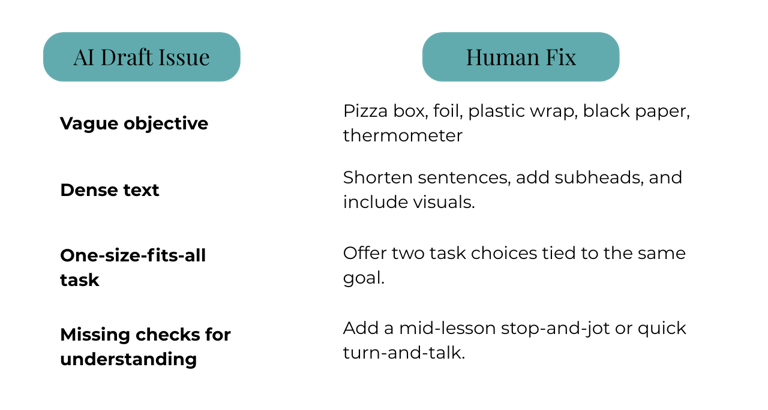
Common draft issues and easy fixes:
AI Draft Issue Human Fix Vague objective Rewrite with a clear verb and outcome students can show. Dense text Shorten sentences, add subheads, and include visuals. One-size-fits-all task Offer two task choices tied to the same goal. Missing checks for understanding Add a mid-lesson stop-and-jot or quick turn-and-talk.
Small edits protect dignity and access. When a plan honors students’ backgrounds, classroom trust grows. You feel lighter too, because the lesson sounds like you.
Teach Students About AI for Future-Ready Skills
Bring AI into the open. Treat it like a lab tool students can learn to use with care. When you name what it can do and what it gets wrong, students build judgment, not fear.
Start with simple routines:
Model your process: Show how you prompt, review, and edit. Say what you keep and what you change.
Talk about bias: Explain that AI reflects its training data. Ask students to spot gaps or unfair language.
Practice citation: Credit sources, even when AI helped. Teach when and how to paraphrase.
Set boundaries: Clarify what help is allowed on drafts, homework, and tests.
Tie the learning to real futures. I share how AI saves me an hour I now spend building digital products, writing a newsletter, or studying a crypto strategy with a small, steady budget. That link between smart tools and steady income is not theory. It is a practical path your students can start to see.
Project ideas that build skills:
Prompt clinic: Students refine a prompt to improve clarity and fairness, then compare outputs.
Fact-check relay: Pair AI summaries with a quick check against a trusted source. Mark what holds up.
Creator workflow: Plan a simple online product, like a study guide. Use AI for drafts, then add voice, visuals, and a price sheet.
Ethics circle: Discuss when AI support helps learning and when it hides it. Set class norms together.
Future-ready does not mean constant screens. It means knowing when to ask for help, how to judge quality, and how to turn saved time into value. In your room, that value can be more reading, more talk, and a few extra minutes to sketch the next step in your business or your travel plan.
Conclusion
Lesson planning can feel heavy, then AI turns the weight into rhythm. Faster prep, clearer lessons, and calmer days follow. You stay in charge, your voice steady at the center, while the draft work gets done in minutes. The extra hour becomes a slide deck for your shop, a newsletter for tutoring, or a quiet review of your crypto plan.
Start small, one tool, one routine. Open SchoolAI, pick a Space, and build a plan that fits your class and your life. Use the quick differentiation for ESL, the progress checks that show who needs help, and the simple add-ons for practice. Keep what works, toss the rest, and let your style shine.
This is about time, but also about choice. More space for students, more space for you. A weekend flight paid by your product sales. A tax-savvy route through a new city where you grade on a balcony and publish while the sun drops behind tiled roofs. Teaching stays sacred, and your freedom grows.
Try SchoolAI today, then share what changes in your week. Post your wins, your tweaks, your questions. Your voice helps the next teacher breathe easier.
Thank you for reading and for the work you do. Here is to better, faster, easier plans, and a location-independent life that pays you back for every late night you have already given.