Create STEAM Lesson Plans That Actually Sell
You are tired, not just sleepy, and the stack of papers keeps finding its way back to your bag. Still, you picture a clean inbox, suitcase by the door, and sales pinging while the plane climbs through the clouds. That is the hook, the quiet promise of selling strong S.T.E.A.M. lessons online. S.T.E.A.M. means Science, Technology, Engineering, Arts, and Math. When you sell lesson plans, you create once and sell many times, then get paid from anywhere. Platforms like Teachers Pay Teachers and Outschool make that possible, even if you are still teaching full-time.
LESSONS PLANS
Jerusha
11/5/20259 min read

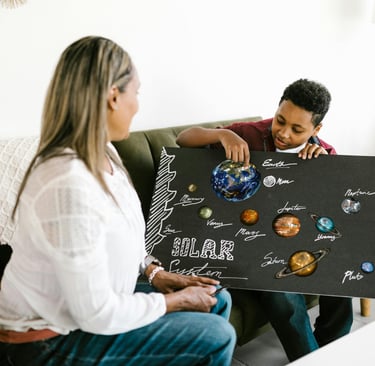
Photo by RDNE Stock project
In 2025, the lessons that move are tech-rich and hands-on. Think AI basics, simple robotics, safe AR/VR demos, and coding tasks that end in something students can hold or show. Add project-based learning, art-infused science, environmental themes, and clear differentiation. Buyers want step-by-step guides, editable slides, printables, and options for live or self-paced use.
Here is the plan you came for. We will cover high-demand niches, smart pricing, SEO keywords that actually rank, and bundle structures that boost average order value. You will see how to package, preview, and promote so your store pays for your next trip, and your Sunday night feels lighter.
What Makes STEAM Lesson Plans Sell in 2025?
You are not guessing anymore. Buyers want plans that feel modern, work in tight schedules, and spark real progress. On Teachers Pay Teachers and Outschool, the listings that rise pair tech with tactile work, and offer clean data for proof. Short prep, high engagement, clear outcomes. That is the mix.
Top Trends Driving Demand for STEAM Resources
Parents and teachers want both joy and jobs in the same package. They worry about AI, future work, and missed basics. They also want school to feel alive again. That is why these trends keep winning.
Digital tools that feel real: Virtual labs, browser-based coding, and safe AI prompts reduce setup time and raise reach. A Chromebook and a login can stand in for a full cart of gear. Reports on AI in classrooms for 2025 point to rising demand for practical, student-facing tools that build real skills, not just talk about them. See the overview in Forbes on 2025 STEM education trends.
Hands-on, gamified tasks: Points, badges, and clear levels keep kids moving. When a unit has a boss level, students beg for the next step. Parents see grit. Teachers see fewer off-task minutes. The key is simple game loops that tie to standards, not fluff.
Built for any setting: Strong sellers ship with print-and-go, slides, and short video clips. You can run them live, hybrid, or fully remote. Sub plans and pacing guides add trust. On Outschool, that flexibility means you can teach one session live, then sell the replay with guides for later use.
Data that fits the gradebook: Quick checks, auto-graded quizzes, and rubric-ready scoring help. When an admin asks for evidence, the numbers are there. The push for equity and access across STEM also calls for clear metrics and supports for varied learners, a trend highlighted in the Beyond100K 2025 STEM trends report.
What ties this together is evidence with delight. Parents pay for visible growth. Teachers buy time back.
Lesson Plan Types That Move Fastest Online
The listings that fly off the virtual shelf share two traits. They are fun and flexible. They also line up with skills employers reward, like logic, design, and systems thinking. On Teachers Pay Teachers, these make strong bundles. On Outschool, they make repeatable live classes and self-paced courses.
Beginner coding for all ages: Scratch stories, Python puzzles, and block-to-text bridges. Short challenges, clear wins, and no heavy installs. Add leveled extensions and you serve second grade through ninth without rebuilding.
Design challenges with everyday stuff: Bridges from index cards, wind cars from straws, or light art from LEDs and copper tape. Students plan, build, test, and tweak. You supply templates, rubrics, and quick demos. Families love the low-cost supply list.
3D modeling that meets art and tech: Tinkercad shapes, simple CAD for props, or math solids that become ornaments. Tie form to function and offer printable stencils. A gallery walk at the end turns work into pride.
Online science experiments: Safe-at-home chemistry, data collection with phone sensors, or virtual dissections from reputable platforms. Pair step-by-step slides with sample data sets, so classes without supplies still finish strong.
Tech-infused math adventures: Pattern hunts with AR overlays, spreadsheet simulations, or coding tiny math games. Students see the math breathe. You include auto-graded practice and a project brief that asks students to explain choices.
Why these sell: they scale across grades, invite student voice, and point toward workforce skills. They also photograph well, which helps previews convert. Add quick-start notes, editable slides, and a 45-minute version, and you fit tight periods or block days without stress.
How to Design STEAM Lesson Plans Buyers Love
You want lessons that pop off the page and slide into a busy week. Think clear steps, rich artifacts, and easy wins for mixed-ability groups. On Teachers Pay Teachers and Outschool, buyers favor projects that use simple supplies, build real skills, and photograph well. Keep it tactile, keep it tech-friendly, and build in reflection so growth shows up on paper and in student voices.
Building Hands-On Projects That Spark Joy
Project-based learning works when it solves something that feels real. Pick problems that students care about, then scaffold the path from idea to prototype. If you need quick inspiration, these practical guides help frame authentic tasks and student voice: 8 hands-on STEAM projects and a student-centered look at STEAM PBL with reflection tips from Defined Learning’s blog, Embarking on STEAM PBL.
Start with a tight plan, but keep materials simple. Cardboard, tape, copper tape, LEDs, paper clips, index cards, and recycled containers carry most builds. Buyers love low-cost lists they can source today.
Choose real-world prompts: Clean water transport, safe night lights, heat loss at home, pet care systems.
Blend arts with science or tech: Code a mood soundtrack for a climate data story, or design a digital storybook that triggers scene changes with Scratch events.
Include reflection every session: Use short, repeatable prompts so students track progress and choices.
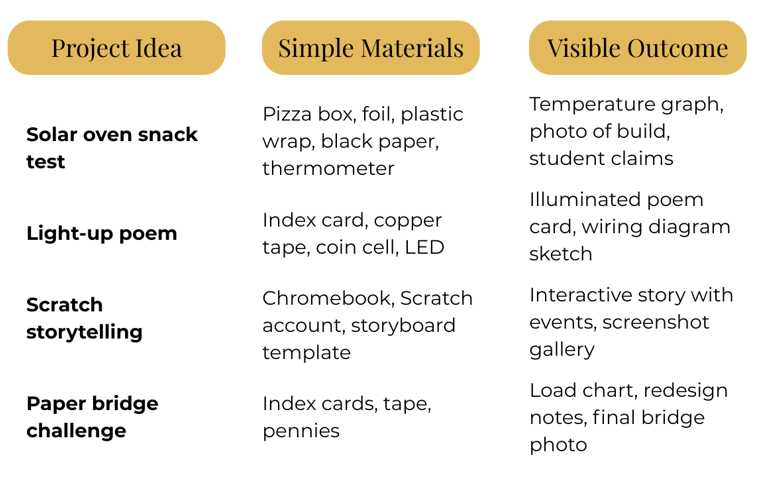
Try this quick planning table to keep projects tight and market-ready.
Add templates that reduce prep and raise trust:
Reflection stems: “Today I tested... The change I made... The result...”
Design journal pages with sketch boxes and quick data tables.
Success criteria: “Model includes labeled diagram, test plan, and evidence.”
Photo prompts for student portfolios. Pictures help listings convert on Teachers Pay Teachers and provide strong previews for Outschool classes.
For more low-lift PBL ideas that translate to sales-ready bundles, scan these streamlined examples: Simple STEAM PBL ideas.
Adding Tech and Gamification for Extra Engagement
Tech should feel like a boost, not a burden. Use free tools that run in a browser and work on school devices.
Scratch for coding stories, quizzes, and simulations. Link events to content goals so a variable or sprite change proves learning.
Kahoot for fast checks that keep energy high. Build question banks that tie to your projects, then include an answer key and data tracker.
Slides plus short screencasts for mini-lessons. Keep clips under six minutes and script them with student actions.
Gamification keeps momentum steady during hybrid or self-paced use:
Rewards systems: Offer badges for milestones like “Prototype Tested,” “Bug Fixed,” or “Peer Coach.” Include printable badges and a simple badge tracker page.
Leaderboards that celebrate growth: Track iteration counts, bugs solved, or tests run. Focus on process metrics, not just scores, to support all learners.
Progress trackers: A one-page roadmap with five checkpoints works across grades. Students color in steps, upload a photo, then reflect in one line.
Package it for marketplaces:
On Teachers Pay Teachers, include a teacher guide, 45-minute and 90-minute pacing, printable trackers, and editable slides. Add a student gallery prompt so buyers can imagine results.
On Outschool, script live moments and quiet build time. Use Kahoot for mid-class checks, Scratch for the final artifact, and your tracker for parent updates between sessions.
Small habits raise quality and repeat sales:
Set one tech goal per lesson so students succeed early.
Use consistent icons for Build, Test, Reflect. Visual cues reduce friction.
Collect sample student work to show rigor and joy in previews.
When you pair simple materials with clear tech routines and a light game loop, you get lessons that run smooth, document growth, and sell while you pack your carry-on.
Proven Strategies to Sell Your STEAM Plans Online
You want sales that feel steady, honest, and earned. The right platform, a clear setup, and a simple marketing rhythm can turn late-night planning into income that keeps showing up. Treat your listings like a storefront and your audience like neighbors who talk. Small, consistent moves build trust and repeat sales.
Choosing and Optimizing Your Platform
Both Teachers Pay Teachers and Outschool can work, but they serve different goals.
Teachers Pay Teachers suits downloadable plans, templates, and bundles. You build once, then earn over time. It is more passive, but you compete on search and visuals. Sellers report shifts in traffic and buyer behavior, so plan for iteration. See this breakdown of how selling on TpT has changed in recent years in 5 Ways Selling on Teachers Pay Teachers Has Changed. For a pragmatic look at fees, competition, and passive income potential, scan this independent review, Teachers Pay Teachers Review: Is Selling on TPT Worth It?.
Outschool fits live, interactive classes where your presence drives value. You trade time for higher per-seat income and fast feedback from families. If you enjoy teaching live and building a loyal parent base, it can stack well with TpT. A quick overview of Outschool’s class setup, fees, and user experience is in this 2025 guide, Outschool Price Guide: Is Outschool Worth It (2025)?.
Use this simple setup checklist to optimize either path.
Write SEO-first titles: lead with the outcome, grade band, and keywords. Example: “AI Ethics Debate Unit, Grades 6–8, Printable + Slides.”
Front-load your preview: first three images or slides must show the final artifact, rubric, and a one-page overview. Avoid clutter.
Add a 20–45 second video preview: show the student product, your voice, and pacing. Keep the audio clean and the hook clear.
Include variants: 45-minute and 90-minute pacing, print and digital, single lesson and bundle.
Use clean cover design: large title, grade band, and a single strong photo. Test two covers and keep the winner.
Track trends without chasing fads: update listings with fresh keywords when you add samples or rubrics. Rotate in terms buyers search, like AI prompts, robotics, NGSS, or block coding.
Refresh quarterly: new photos, one added resource, and a tighter description. On marketplaces, freshness signals help ranking.
Mind your calendar: publish seasonal STEM challenges four to six weeks early, then pin them in your store or profile.
A simple split strategy works well. Post polished downloads on TpT, then teach a live version of your top unit on Outschool to gather reviews, photos, and FAQs you can feed back into your listings.
Marketing Tips to Boost Visibility and Sales
You do not need paid ads to move the needle. Show up where teachers and parents already talk, then invite them to your list.
Start with free channels that reward consistency.
Share in educator Facebook groups: post a short tip, one clean photo, and a link to a free sample. Follow group rules and help first.
Make teaser videos for YouTube: 3–5 minute demos of the student outcome, not the whole lesson. End with a link to the bundle or class.
Collaborate with teaching influencers: offer a review copy, co-host a live build, or trade a short tutorial. Aim for audiences that match your grade band.
Build an email list from day one. It is your engine for repeat buyers and soft launches.
Offer a lead magnet: a one-page design journal, an AI prompt bank, or a three-day mini challenge.
Use a short welcome series: 3 emails that introduce your best resource, a classroom story, and a time-saving tip. Add one clear link in each.
Segment by grade and subject: send the right bundle to the right inbox. Keep cadence light, weekly or biweekly.
Launch with a pattern: teaser on Monday, behind-the-scenes midweek, and a clean call to buy on Friday.
Keep your promo flywheel simple.
Post one short video a week that shows results.
Share one customer quote or photo.
Send one email with a tip and a link.
If your audience includes global families or you sell from your own site, consider offering cryptocurrency as an extra option. Some buyers abroad prefer Bitcoin or stablecoins for speed and lower fees. Use a trusted processor on your own storefront, and make it an optional lane, not the default. Marketplaces like Teachers Pay Teachers and Outschool have their own payment systems, so keep crypto to your direct sales or tutoring offers.
Small habits compound. Reply to comments. Update thumbnails. Add a fresh student sample. Over a few months, your store feels alive, your classes fill faster, and the ping of a new order starts to sound like breathing room.
Conclusion
The suitcase by the door, inbox calm, sales pinging mid-flight can be real. Create once, sell many times, and turn classroom skills into income that travels with you, while your lessons build proof and pride for buyers.
Start small this week. Pick one trending idea, like a simple Scratch coding project with a clear outcome and quick checks, then polish the cover and preview. Share your first plan on Teachers Pay Teachers, and list a live or self-paced version on Outschool to gather reviews and momentum.
Thank you for reading. Take the first step toward your digital business dream, then let the next ping meet you at the gate.